Doc repo at build time
 Luis Fernando Molina committed
No files matched your search
@@ -148,7 +148,7 @@ function newUiObjectConstructor () {
|
||||
currentStatus: true,
|
||||
label: undefined,
|
||||
visible: true,
|
||||
icons: ['menu-tensor-free-angles', 'angle-to-parent-360', 'angle-to-parent-180', 'angle-to-parent-090', 'angle-to-parent-045'],
|
||||
icons: ['angle-to-parent-000', 'angle-to-parent-360', 'angle-to-parent-180', 'angle-to-parent-090', 'angle-to-parent-045'],
|
||||
rawRadius: 8,
|
||||
targetRadius: 0,
|
||||
currentRadius: 0,
|
||||
@@ -163,7 +163,7 @@ function newUiObjectConstructor () {
|
||||
currentStatus: true,
|
||||
label: undefined,
|
||||
visible: true,
|
||||
icons: ['headphones', 'distance-to-parent-025', 'distance-to-parent-050', 'distance-to-parent-100', 'distance-to-parent-150', 'distance-to-parent-200'],
|
||||
icons: ['distance-to-parent-000', 'distance-to-parent-025', 'distance-to-parent-050', 'distance-to-parent-100', 'distance-to-parent-150', 'distance-to-parent-200'],
|
||||
rawRadius: 8,
|
||||
targetRadius: 0,
|
||||
currentRadius: 0,
|
||||
|
||||
@@ -299,7 +299,7 @@ function newLayersPanel () {
|
||||
The overall idea here is that we need to keep syncronized the panel with the layers that are
|
||||
defined at the Designer. Users can connect or disconnect any objext resulting in changes in which
|
||||
are valid layers and which not at any point in time. So what we do here is trying to keep the panel
|
||||
only with the layers that are connected to the Charting System hiriarcy.
|
||||
only with the layers that are connected to the Charting Space hiriarcy.
|
||||
|
||||
To achieve this, first we are going to move all session related cards to a local array. Then we are
|
||||
going to check for layers at the designer, and will move back the cards which still have layers well
|
||||
|
||||
@@ -87,14 +87,14 @@ function newChartSpace () {
|
||||
let rootNodes = canvas.designerSpace.workspace.workspaceNode.rootNodes
|
||||
for (let i = 0; i < rootNodes.length; i++) {
|
||||
let rootNode = rootNodes[i]
|
||||
if (rootNode.type === 'Charting System') {
|
||||
if (rootNode.type === 'Charting Space') {
|
||||
thisObject.payload = rootNode.payload
|
||||
}
|
||||
}
|
||||
|
||||
thisObject.viewport = newViewport()
|
||||
if (thisObject.payload.node.viewport === undefined) {
|
||||
if (ERROR_LOG === true) { logger.write('[WARN] initialize -> There must exist a Viewport node attached to the Charting System node in order for the Viewport save its properties. ') }
|
||||
if (ERROR_LOG === true) { logger.write('[WARN] initialize -> There must exist a Viewport node attached to the Charting Space node in order for the Viewport save its properties. ') }
|
||||
} else {
|
||||
thisObject.viewport.payload = thisObject.payload.node.viewport.payload
|
||||
}
|
||||
|
||||
@@ -178,7 +178,7 @@ function newDesignerSpace () {
|
||||
'crypto-exchanges',
|
||||
'crypto-exchange',
|
||||
'exchange-markets',
|
||||
'charting-system',
|
||||
'charting-space',
|
||||
'time-line-chart',
|
||||
'time-frame-scale',
|
||||
'time-scale',
|
||||
@@ -227,6 +227,7 @@ function newDesignerSpace () {
|
||||
'distance-to-parent-100',
|
||||
'distance-to-parent-050',
|
||||
'distance-to-parent-025',
|
||||
'distance-to-parent-000',
|
||||
'angle-to-parent-360',
|
||||
'angle-to-parent-180',
|
||||
'angle-to-parent-090',
|
||||
|
||||
@@ -91,7 +91,7 @@ function newFloatingSpace () {
|
||||
payload.node.type === 'Trading System' ||
|
||||
payload.node.type === 'Network' ||
|
||||
payload.node.type === 'Crypto Ecosystem' ||
|
||||
payload.node.type === 'Charting System' ||
|
||||
payload.node.type === 'Charting Space' ||
|
||||
payload.node.type === 'Data Mine'
|
||||
) {
|
||||
return false
|
||||
|
||||
@@ -724,8 +724,8 @@
|
||||
},
|
||||
{
|
||||
"action": "Add UI Object",
|
||||
"label": "Add Charting System",
|
||||
"relatedUiObject": "Charting System",
|
||||
"label": "Add Charting Space",
|
||||
"relatedUiObject": "Charting Space",
|
||||
"actionFunction": "payload.onMenuItemClick"
|
||||
},
|
||||
{
|
||||
@@ -4772,7 +4772,7 @@
|
||||
"isPersonalData": true
|
||||
},
|
||||
{
|
||||
"type": "Charting System",
|
||||
"type": "Charting Space",
|
||||
"menuItems": [
|
||||
{
|
||||
"action": "Add UI Object",
|
||||
@@ -4792,7 +4792,7 @@
|
||||
"action": "Delete UI Object",
|
||||
"askConfirmation": true,
|
||||
"confirmationLabel": "Confirm to Delete",
|
||||
"label": "Delete Charting System",
|
||||
"label": "Delete Charting Space",
|
||||
"iconPathOn": "delete",
|
||||
"iconPathOff": "delete",
|
||||
"actionFunction": "payload.onMenuItemClick"
|
||||
@@ -4801,7 +4801,7 @@
|
||||
"isHierarchyHead": true,
|
||||
"addLeftIcons": true,
|
||||
"level": 1,
|
||||
"icon": "charting-system",
|
||||
"icon": "charting-space",
|
||||
"properties": [
|
||||
{
|
||||
"name": "viewport",
|
||||
@@ -4878,7 +4878,7 @@
|
||||
"isTitleAllwaysVisible": true,
|
||||
"icon": "time-machine",
|
||||
"chainAttachesTo": {
|
||||
"compatibleTypes": "->Charting System->"
|
||||
"compatibleTypes": "->Charting Space->"
|
||||
},
|
||||
"propertyNameAtParent": "timeMachines",
|
||||
"properties": [
|
||||
@@ -4939,7 +4939,7 @@
|
||||
"level": 2,
|
||||
"icon": "viewport",
|
||||
"chainAttachesTo": {
|
||||
"compatibleTypes": "->Charting System->"
|
||||
"compatibleTypes": "->Charting Space->"
|
||||
},
|
||||
"propertyNameAtParent": "viewport"
|
||||
},
|
||||
|
||||

|
Before Width: | Height: | Size: 3.0 KiB After Width: | Height: | Size: 15 KiB |

|
Before Width: | Height: | Size: 6.0 KiB After Width: | Height: | Size: 5.9 KiB |

|
Before Width: | Height: | Size: 8.9 KiB After Width: | Height: | Size: 8.8 KiB |

|
Before Width: | Height: | Size: 15 KiB After Width: | Height: | Size: 14 KiB |

|
Before Width: | Height: | Size: 28 KiB After Width: | Height: | Size: 28 KiB |

|
After Width: | Height: | Size: 13 KiB |

|
After Width: | Height: | Size: 3.3 KiB |

|
Before Width: | Height: | Size: 5.0 KiB After Width: | Height: | Size: 5.8 KiB |

|
Before Width: | Height: | Size: 5.4 KiB After Width: | Height: | Size: 6.0 KiB |

|
Before Width: | Height: | Size: 5.9 KiB After Width: | Height: | Size: 6.6 KiB |

|
Before Width: | Height: | Size: 6.5 KiB After Width: | Height: | Size: 7.2 KiB |

|
Before Width: | Height: | Size: 7.2 KiB After Width: | Height: | Size: 7.7 KiB |
@@ -30,7 +30,7 @@ record: "A record is the compendium of information stored for each period of tim
|
||||
|
||||
formula: "In the context of a record definition, formulas are used to assign a value to the property, usually in the form of a variable declared in the calculation or data building procedure."
|
||||
|
||||
calculations_procedure: "The calculations procedure processes information to be fed to calculated properties. Calculated properties are not stored in the data set; instead, they are calculated in real-time as the data is consume by others."
|
||||
calculations_procedure: "The calculations procedure processes information to be fed to calculated properties. Calculated properties are not stored in the data set; instead, they are calculated in real-time as the data is consumed by others."
|
||||
|
||||
procedure_loop: "The procedure loop holds the JavaScript code that cycles through an input processing information to generate an output."
|
||||
|
||||
|
||||
@@ -507,6 +507,7 @@ table.definitionTable tbody tr td {
|
||||
margin: 0px;
|
||||
border: 0px;
|
||||
vertical-align: middle;
|
||||
min-width: 100px;
|
||||
}
|
||||
|
||||
table.hierarchyTable {
|
||||
|
||||
@@ -1308,7 +1308,11 @@ To add a record definition node, select *Add Record Definition* on the product d
|
||||
|
||||
record: "A record is the compendium of information stored for each period of time, including the start and end datetime of the period along with the properties that provide the information the indicator is meant to generate."
|
||||
|
||||
Records may have as many properties as required. The order in which record properties are defined around the parent record definition node is the order in which they are stored in the actual record.
|
||||
Records may have as many properties as required.
|
||||
|
||||
{% include important.html content="The order in which record properties are defined around the parent record definition node is the order in which they are stored in the actual record." %}
|
||||
|
||||
{% include tip.html content="The first two records are usually the *begin* and *end* records, featuring the corresponding datetimes that indicate when the record starts and ends." %}
|
||||
|
||||
### Adding a Record Property
|
||||
|
||||
@@ -1320,21 +1324,21 @@ Select *Configure Property* on the menu to access the configuration.
|
||||
|
||||
```js
|
||||
{
|
||||
"codeName": "begin",
|
||||
"codeName": "record-name",
|
||||
"isString": false,
|
||||
"isCalculated": true
|
||||
}
|
||||
```
|
||||
|
||||
* ```codeName``` is the name of the record as it is used in the bot's code. Most record definitions will have a *begin* date and an *end* date.
|
||||
* ```codeName``` is the name of the record as it is used in the bot's code.
|
||||
|
||||
* ```isString``` determines if the field is a text string or if, in turn, is a numeric field. Dates are stored in the *epoch* format, which is numeric. The reason why this configuration is important is because fields which are strings need to be stored between "double quotes".
|
||||
|
||||
* ```isCalculated``` determines if the field is stored in the dataset or if, instead, is calculated at a later stage, as explained in the *input to output cycle* earlier. A value *true* means that the record is not stored. In the case ```isCaculated``` is not defined in the configuration, it is assumed to be false.
|
||||
* ```isCalculated``` determines if the field is stored in the dataset or if, instead, is calculated at a later stage. A value *true* means that the record is not stored. In the case ```isCaculated``` is not defined in the configuration, it is assumed to be false.
|
||||
|
||||
[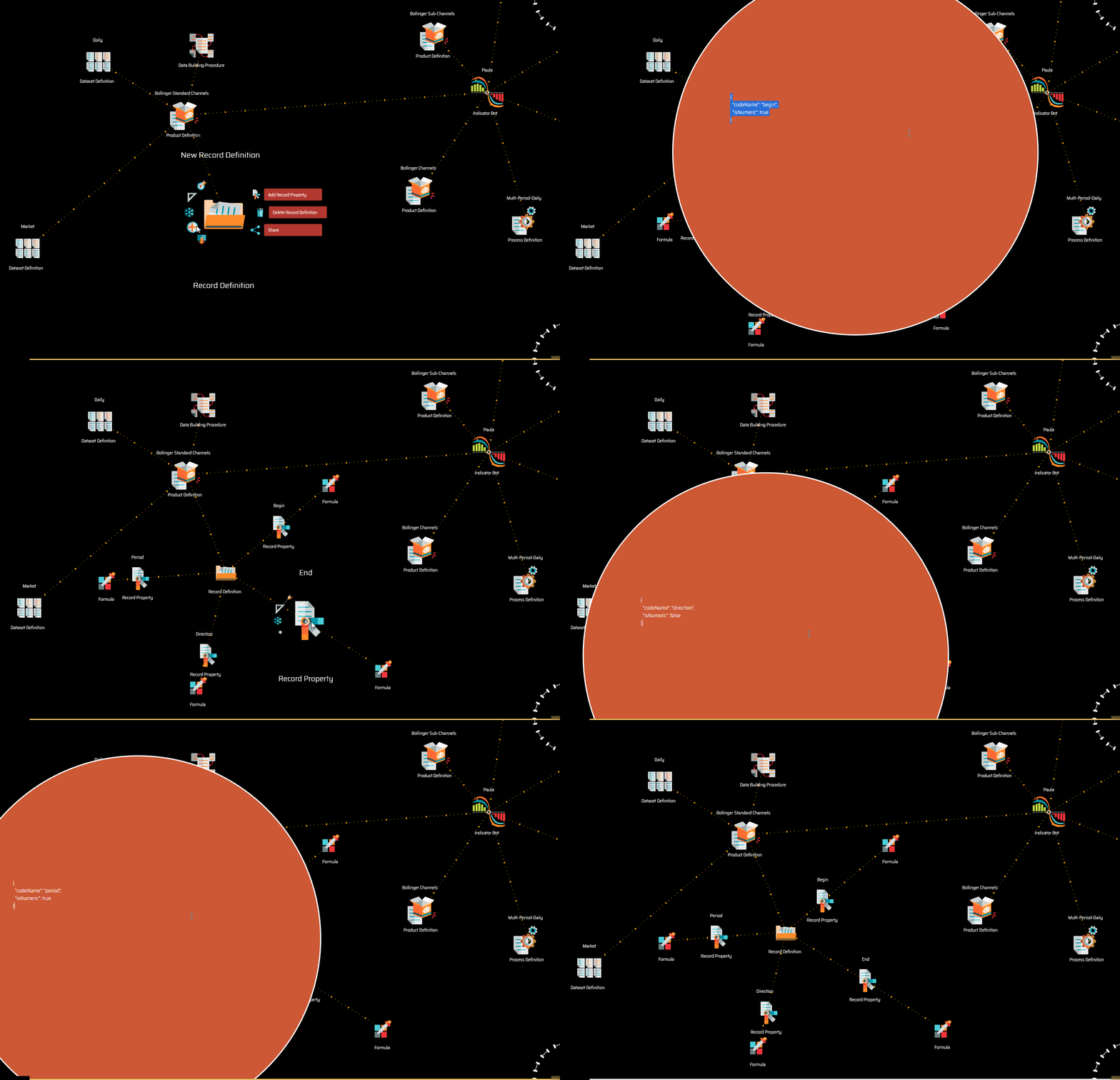](https://user-images.githubusercontent.com/13994516/69139160-3ce72000-0ac0-11ea-9566-a259c9ea6194.gif)
|
||||
|
||||
The image above shows the four different record properties defined for Paula's Bollinger Standard Channels product.
|
||||
The image above shows a record definition with four record properties.
|
||||
|
||||
|
||||
|
||||
@@ -1348,6 +1352,19 @@ The image above shows the four different record properties defined for Paula's B
|
||||
|
||||
formula: "In the context of a record definition, formulas are used to assign a value to the property, usually in the form of a variable declared in the calculation or data building procedure."
|
||||
|
||||
A formula may act in slightly different ways depending on the ```isCaculated``` attribute in the record property configuration:
|
||||
|
||||
* When a property is calculated (```"isCalculated": true```), the formula assigns to the property a value that is calculated in the calculations procedure. Even if the property is not stored in the dataset, it is made available as a *calculated property* to other bots that may have the dataset as input.
|
||||
|
||||
* When a property is not calculated (```"isCalculated": false``` or the attribute is not defined in the configuration) the formula is applied in the data building procedure.
|
||||
|
||||
### Adding a Formula
|
||||
|
||||
To add a formula, select *Add Formula* on the record property menu.
|
||||
|
||||
|
||||
|
||||
|
||||
|
||||
|
||||
|
||||
@@ -1358,7 +1375,21 @@ formula: "In the context of a record definition, formulas are used to assign a v
|
||||
|
||||
**{{site.data.data_mine.calculations_procedure}}**
|
||||
|
||||
calculations_procedure: "The calculations procedure processes information to be fed to calculated properties. Calculated properties are not stored in the data set; instead, they are calculated in real-time as the data is consume by others."
|
||||
calculations_procedure: "The calculations procedure processes information to be fed to calculated properties. Calculated properties are not stored in the data set; instead, they are calculated in real-time as the data is consumed by others."
|
||||
|
||||
Bots store data in the minimized array format as a strategy to build the lightest possible datasets. For the same reason, a bot may chose not to store information that is easily calculable.
|
||||
|
||||
For example, imagine an indicator that stores buy and sell volumes... does it *need* to store the total volume? Given that it is so easy to calculate, the answer is *probably* no. IT is up to the developer to decide, but it is certainly not required.
|
||||
|
||||
{include note.html content="It may not be worthy to store information that can be easily calculated at a later stage." %}
|
||||
|
||||
The calculations procedure calculates the properties that the developer chose not to store in the dataset.
|
||||
|
||||
### Adding a Calculations Procedure
|
||||
|
||||
To add a calculations procedure, select *Add Missing Items* on the product definition node menu. Items that may be missing are created along with the basic structure of nodes required to define them.
|
||||
|
||||
|
||||
|
||||
|
||||
|
||||
@@ -1370,7 +1401,7 @@ calculations_procedure: "The calculations procedure processes information to be
|
||||
|
||||
**{{site.data.data_mine.procedure_loop}}**
|
||||
|
||||
procedure_loop: "The procedure loop holds the JavaScript code that cycles through an input processing information to generate an output."
|
||||
procedure_loop: "The procedure loop holds the JavaScript code that cycles through reading an input processing information to generate an output."
|
||||
|
||||
|
||||
|
||||
|
||||
@@ -0,0 +1,2 @@
|
||||
User-agent: *
|
||||
Disallow: /
|
||||