
11 KiB
title, summary, sidebar, permalink
| title | summary | sidebar | permalink |
|---|---|---|---|
| Product Definition | suite_sidebar | suite-product-definition.html |
Introduction
Now that we have covered processes definitions, let's go back to the top level structure and do the same with the structure of products definitions.
We will take a look into Paula's Bollinger Standard Channels product and explore the three main definitions required: records definition, dataset definitions, calculation procedures and data building procedure.
| Records Definition | Dataset Definition | Calculations Procedure | Data Building Procedure |
|---|---|---|---|
 |
 |
 |
 |
But first, let's take a look at the image below, showing a piece of configuration available within the main product definition node.
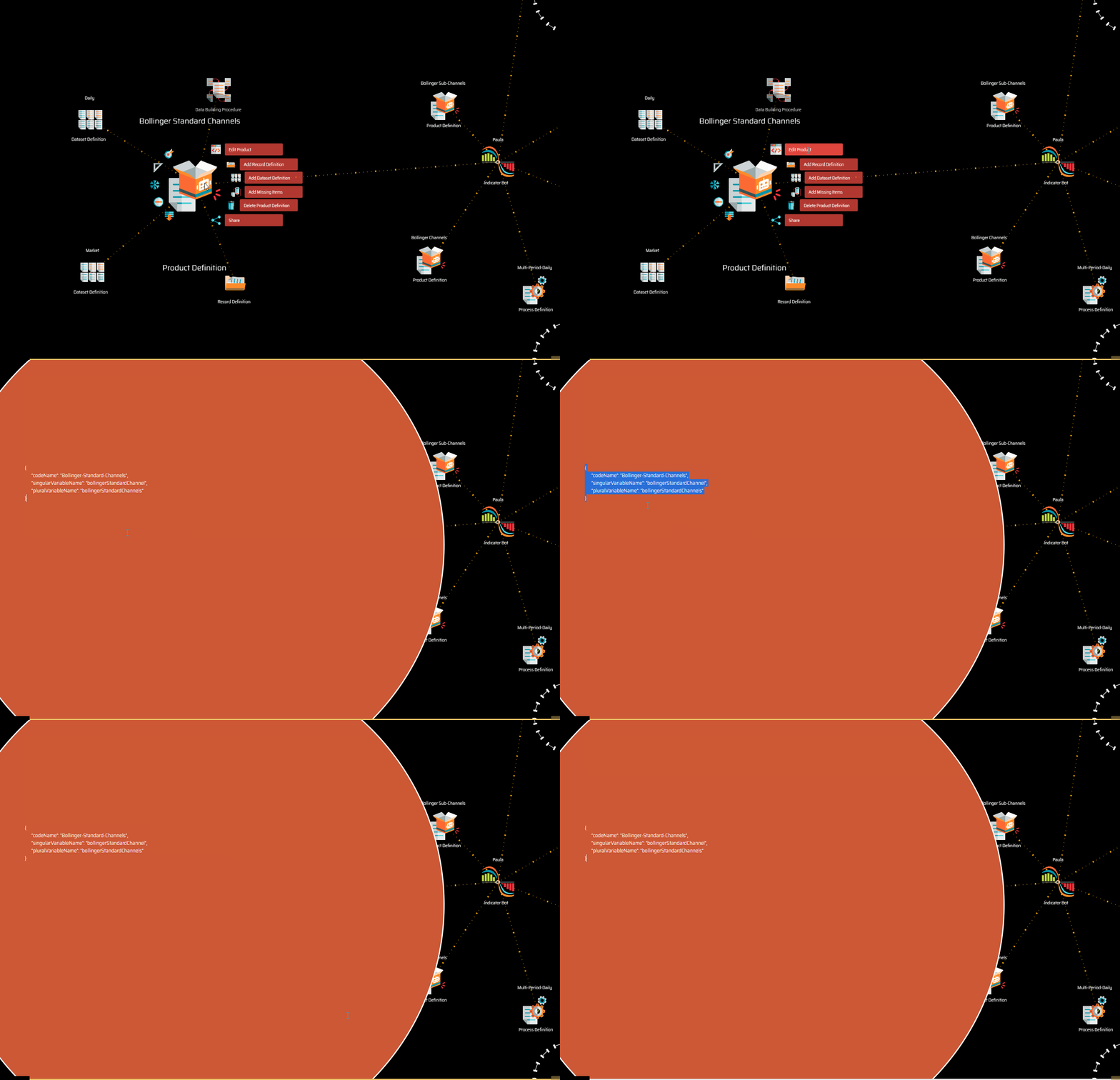
{
  "codeName": "Bollinger-Standard-Channels",
  "singularVariableName": "bollingerStandardChannel",
  "pluralVariableName": "bollingerStandardChannels"
}
-
codeNameis the name of the product as it is used within the bot's code. -
singularVariableNameis the singular form of the name of the variable representing the product, as it will later be used on strategies (i.e.:bollingerChannel.direction, where bollingerChannel is the name of the product as defined in its configuration and direction is the name of the property, as you will see later on in the Records Definition section). -
pluralVariableNameis the plural form of the variable.
NOTE: Remember that names set in configuration files are the ones used in the bot's code, not the label that may be set directly over the node. You may use a descriptive name on the label as a personal reference if you wish, but it will never be used in the code.
Records Definition
This is where indicators define how many fields, what fields and in which order those fields will be stored in each record.
| Record Property |
|---|
 |
Records may have as many properties as required. Remember that the order in which record properties are defined around the parent record definition node is the order in which they are stored in the actual record.
Record properties have an internal configuration:
{
  "codeName": "begin",
  "isString": false,
  "isCalculated": true
}
-
codeNameis the name of the record as it is used in the bot's code. Most record definitions will have a begin date and an end date. -
isStringdetermines if the field is a text string or if, in turn, is a numeric field. Dates are stored in the epoch format, which is numeric. The reason why this configuration is important is because fields which are strings need to be stored between "double quotes". -
isCalculateddetermines if the field is stored in the dataset or if, instead, is calculated at a later stage, as explained in the input to output cycle earlier. A value true means that the record is not stored. In the caseisCaculatedis not defined in the configuration, it is assumed to be false.
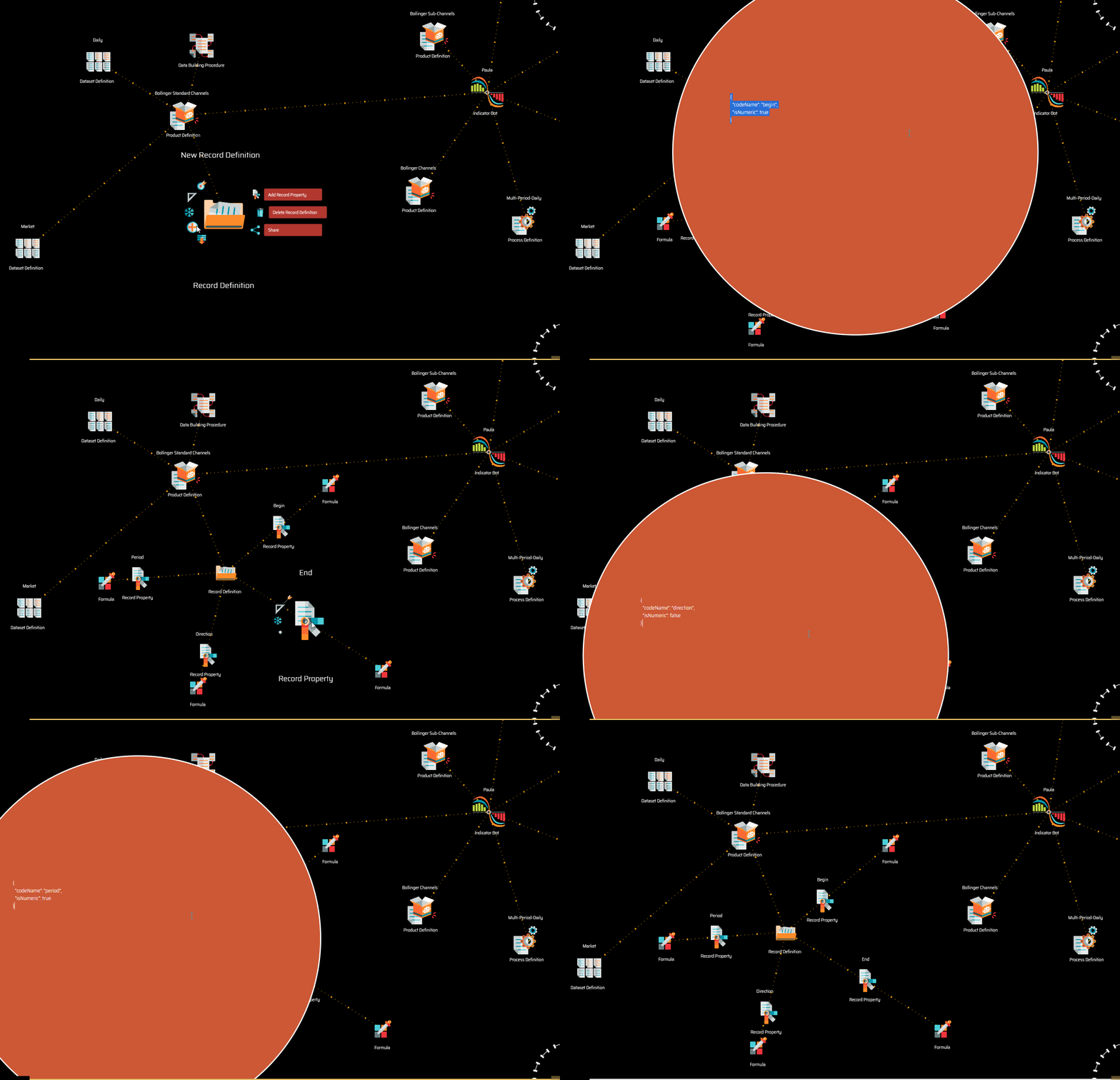
The image above shows the four different record properties defined for Paula's Bollinger Standard Channels product.
You will notice some record properties may have a formula attached. In this context, formulas are used to assign a value to the property.
The formula may act in slightly different ways depending on the isCaculated attribute in the property definition configuration:
-
When a property is calculated (
"isCalculated": true), the formula assigns to the property a value that is calculated in the calculations procedure (we will study this procedure further down this explantion). Even if the property is not stored in the dataset, it is made available as a calculated property to other bots that may have the dataset as input. -
When a property is not calculated (
"isCalculated": falseor the attribute is not defined in the configuration) the formula is applied in the data building procedure (we will get to that later on too).
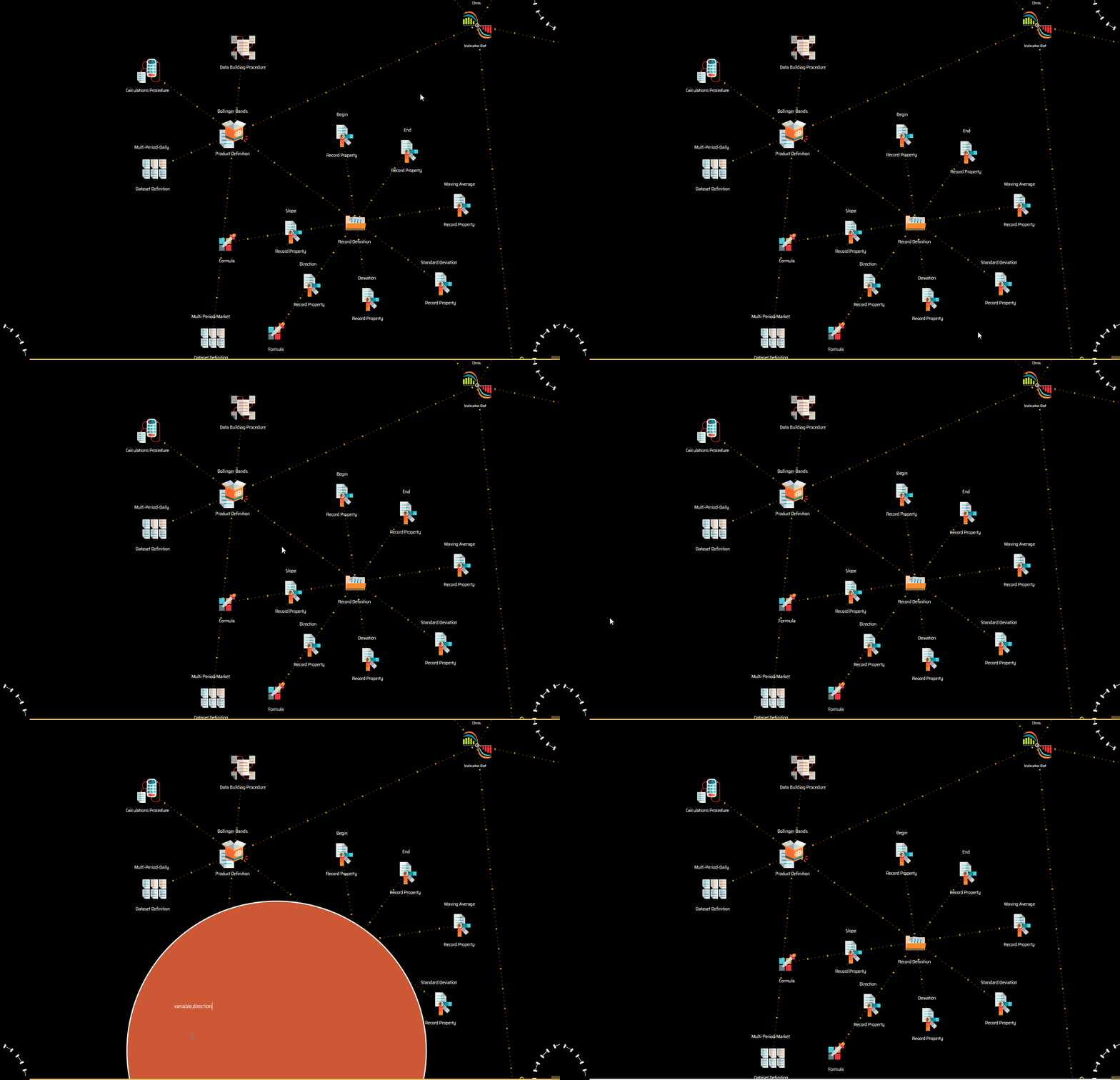
The image above shows Chris' Bollinger Band product record definitions. Notice how the first five properties have no formula while the last two remaining properties do have formulas. These last two properties are calculated.
Dataset Definition
Datasets are defined via a configuration script that contains roughly the following information:
{
  "codeName": "Multi-Period-Market",
  "type": "Market Files",
  "validPeriods": [ "24-hs", "12-hs", "08-hs", "06-hs", "04-hs", "03-hs", "02-hs", "01-hs" ],
  "filePath": "AAMasters/AAPaula.1.0/AACloud.1.1/@Exchange/dataSet.V1/Output/Bollinger-Standard-Channels/Multi-Period-Market/@Period",
  "fileName": "@AssetA_@AssetB.json"
}
The code is pretty much self explanatory:
-
codeNameis the name of the dataset as used within the code. -
typerefers to the type of dataset as described in the Outputs section. -
validPeriodsrefers to the timeperiods covered in the dataset. -
filePathsets the path on which files will be stored. -
fileNamesets the name of the files that constitute the dataset.
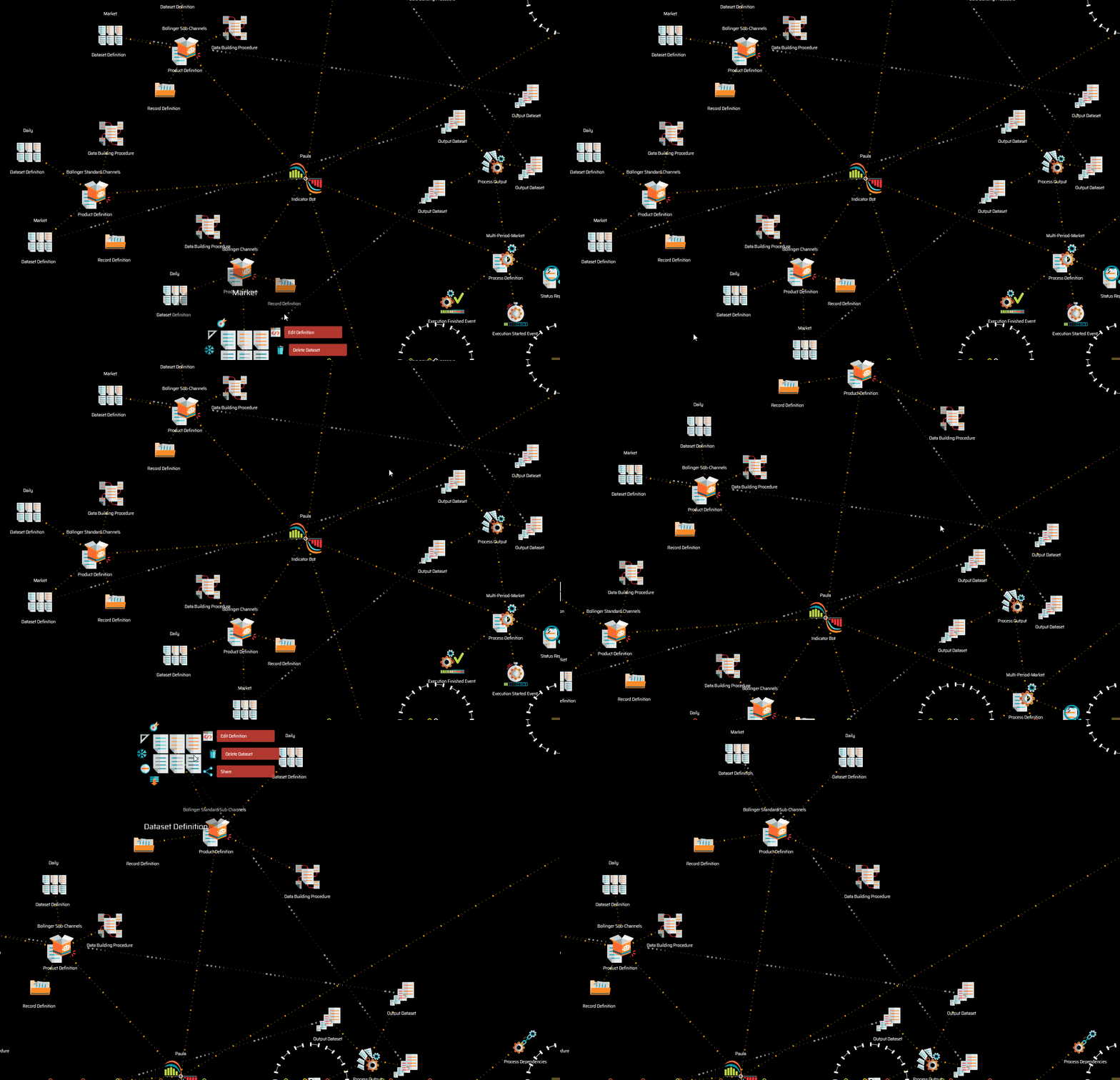
The image above shows the reference that needs to be present between the dataset definition and the corresponding output dataset defined as the process output.
Calculations Procedure
The calculations procedure is where the processing of calculated properties takes place.
| Procedure Initialization | Procedure Loop |
|---|---|
 |
 |
The procedure has two structure of nodes:
-
Procedure initialization allows running a piece of code before the recursive process starts, and it is mostly used to initialize variables.
-
Procedure loop holds the code that will be applied to calculate the properties for each record in a recursive manner.
Let's take Chris' Bollinger Bands calculation procedure as an example.
The code for its procedure initialization is:
variable.lastMovingAverage = 0
variable.SIDE_TOLERANCE = 0.5 * system.timePeriod / system.ONE_DAY_IN_MILISECONDS
variable.SMALL_SLOPE = 1.0 * system.timePeriod / system.ONE_DAY_IN_MILISECONDS
variable.MEDIUM_SLOPE = 2.0 * system.timePeriod / system.ONE_DAY_IN_MILISECONDS
variable.HIGH_SLOPE = 4.0 * system.timePeriod / system.ONE_DAY_IN_MILISECONDS
As you may be able to gather from the code snippet above, five different variables are being initialized with simple calculations.
The code for the procedure loop section is:
if (variable.lastMovingAverage > product.bollingerBand.movingAverage) { variable.direction = "Down" }
if (variable.lastMovingAverage < product.bollingerBand.movingAverage) { variable.direction = "Up" }
if (variable.lastMovingAverage === product.bollingerBand.movingAverage) { variable.direction = "Side" }

variable.delta = Math.abs(product.bollingerBand.movingAverage - variable.lastMovingAverage)

variable.slope = "Extreme"
if (variable.delta < product.bollingerBand.movingAverage * variable.HIGH_SLOPE / 100) { variable.slope = "Steep" }
if (variable.delta < product.bollingerBand.movingAverage * variable.MEDIUM_SLOPE / 100) { variable.slope = "Medium" }
if (variable.delta < product.bollingerBand.movingAverage * variable.SMALL_SLOPE / 100) { variable.slope = "Gentle" }
if (variable.delta < product.bollingerBand.movingAverage * variable.SIDE_TOLERANCE / 100) { variable.slope = "Side" }

variable.lastMovingAverage = product.bollingerBand.movingAverage
As you may see, the first block of code determines the direction of the channel (Down, Up or Side), while the second section determines the inclination of the slope of the Moving Average (Extreme, Steep, Medium, Gentle, side).
Data Building Procedure
The data building procedure is the section in which the operations the bot will perform on the input dataset are defined. These operations should result in the values of the properties previously defined.
| Procedure Initialization | Procedure Loop |
|---|---|
|
|
As you may figure, the data building procedure works pretty much like the calculations procedure, with a procedure initialization structure of nodes and a procedure loop structure of nodes.
Let's take a peek at the code Paula uses to build the Bollinger Standard Channels out of the Bollinger Bands dataset offered by Chris.
Procedure initialization:
variable.period = 1
Procedure loop:
if (record.previous !== undefined) {
    if (record.current.direction === record.previous.direction) {
        variable.period++
    } else {
        variable.period = 1
    }
}
Simple right?
Indeed. You may recall that the Bollinger Standard Channel product has four different record properties defined: begin and end, which are dates taken directly from the input data source, direction, which is handed by Chris as a calculated property, and period, which is all Paula needs to calculate to build this new dataset.