
6.5 KiB
title, summary, sidebar, permalink
| title | summary | sidebar | permalink |
|---|---|---|---|
| Datasets | suite_sidebar | suite-datasets.html |
Bots have two types of outputs: datasets, and status reports.
Datasets File Formats
Bots store data in the form of arrays of records, in a minimized plain text file and the standard JSON format, although not as objects with named properties, but as arrays.

The choice of plain text for storage of large volumes of information has benefits in terms of not requireing any sophisticated technology to store and serve the data (i.e.: no database is required).
Best practice indicates that there needs to be a balance between the amount of data that is stored and calculations that may be performed at runtime.
Storing objects with named properties in the JSON format would be innapropriate as labels would repeat over and over, creating ridiculous amount of unnecessary information. However, storing arrays in the JSON standard facilitates the manipulatioon of files in the context of JavaScript and Node.JS.
Types of Datasets
A dataset is a file or a collection of files.
Different products may require—for different reasons—to store data in different kinds of structures.
For instance, writting a single file with all historic trades in a market spanning several years would be unreasonable, as the file would be too heavy, with hundreds of millions of records. In such case, accessing particular information concerning a specific point in time would require loading the whole market.
Let's look into a specific example...
The Charts offer the possibility to navigate market data in the form of candles over different time frames. It is reasonable to keep candles in time frames of 1 hour and above (up to the 24-hour time frame) in a single file. A market spanning 5 years would have less than 44 thousand records (5 * 365 * 24) of 1-hour candles. It seems reasonable for the Charts to load a single file so as to allow the user to seamlessly navigate large sections of the market in this time frame, for instance, several days or weeks.
However, if the user wishes to browse 1 minute candles it is obvious his or her focus does not span days or weeks, let alone the whole market. The person is surely interested in analyzing a very specific point in time. Therefore, loading a single file with over 2.5 million records (5 * 365 * 24 * 60) would be unreasonable.
In other words, different densities of information require different data structures so that data may be consumed efficiently.
Moreover, bear in mind that data may eventually need to be transferred over the Internet, for intance when consuming indicators from a third-party node in the network. In such settings, the structure of the data becomes a critical issue and not just a matter of convenience or efficiency.
In addition, you wish the trading bot to be able to evaluate conditions and situations as fast as possible, therefore, loading the minimum data required is also a performance concern.
With all this in mind, lets go through the five different types of datasets existing at the moment: market files, daily files, minutes files, single file, and file sequence. These types of datasets define the structure of the data and how it is stored.
-
A market file contains data spanning the whole existence of the market, that is, from the day the pair (e.g. USDT-BTC) started trading up to the present time. The data is stored in one single file, which is appended every time the process runs generating new data.
-
A daily file contains data segmented by day. That is, the process generates one file per day and stores it in the deepest level of a folder tree structure of the following type:
Year > Month > Day. -
A minutes file contains data corresponding to one single minute and is stored in the deepest level of a folder tree structure of the following type:
Year > Month > Day > Hour > Minute. -
A file sequence consists of sequential information that is not necessarily structured on any particular timeframe. The process stores two types of files: the one ending in .Sequence.json contains the number of files in the sequence, and the sequence is formed by multiple files ending in a sequential number (e.g. 15.json).
Sensors and Indicators Output
The route for writing bot's output is built as follows:
Bot Name and version > the version of AACloud (an internal system component) > the version of the dataset > Output folder
e.g.:
\AAOlivia.1.0\AACloud.1.1\Poloniex\dataSet.V1\Output
The format in which bots store their output is standardized. In an attempt to make data highly accessible, a tree-like folder structure is built following this pattern (which may slightly differ from bot to bot, depending on the specific dataset):
Dataset Name > Process Name > Time Frame > Year > Month > Day > Hour
e.g.:
\Candles\Multi-Period-Daily\01-min\2019\08\15
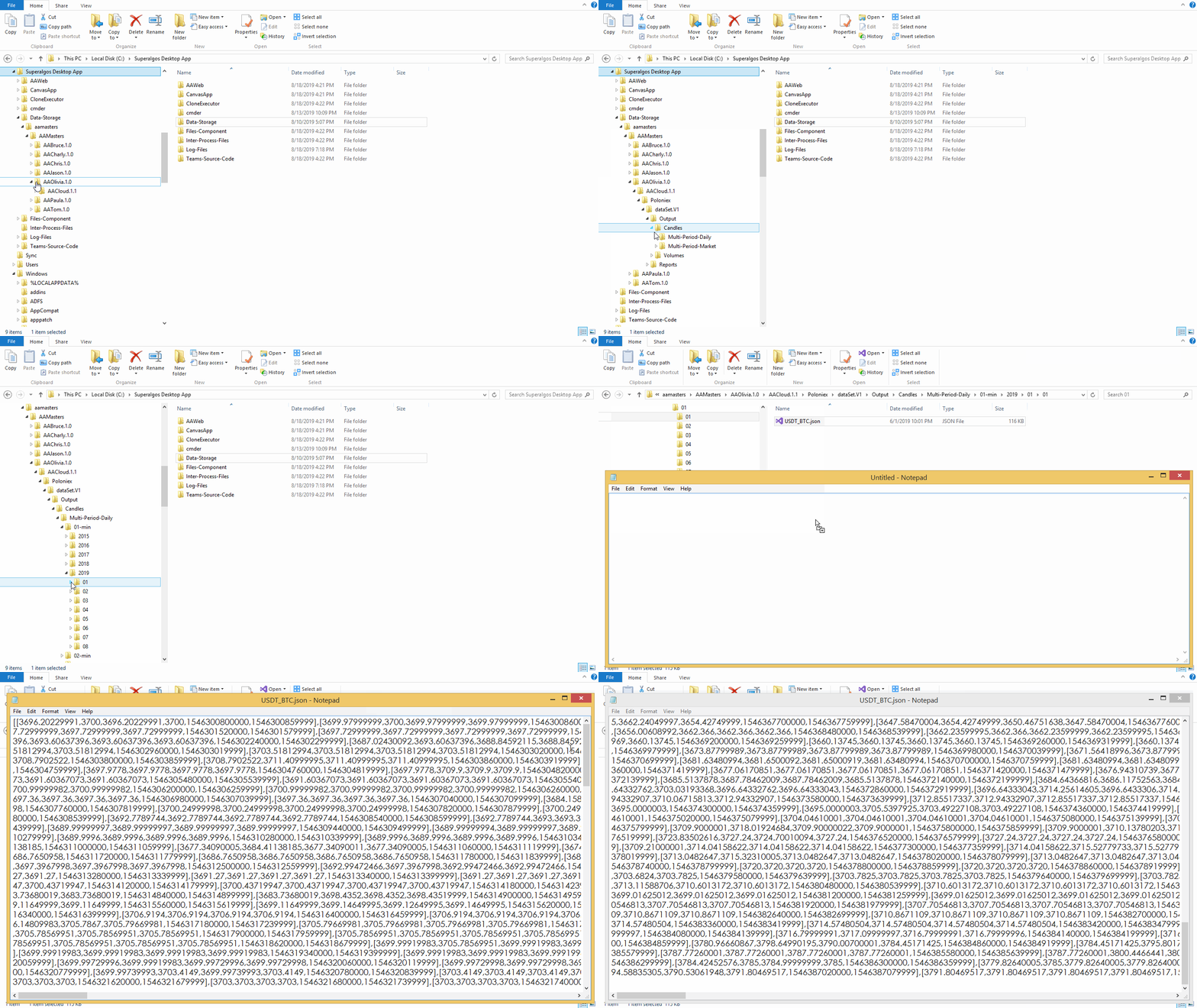
Trading Bot Output
The trading bot is a particular case, as it stores data from multiple simulation and live-trading sessions.
To do this efficiently, the trading bot creates folders for storing the output and status reports of each session, naming each folder after the session ID.
If for some reason you wish to change the name of an output folder for something easier to read, you may include the following snippet under the Edit Session option in the menu of the corresponding session:
"folderName":"YourName"
Your custom name will be displayed along with the session ID in the name of the folder, in the following format:
YourName - 3e139ae2-138c-42ac-99d6-e0cf9c7c6ee6
If you wish to know which ID corresponds to a certain session without defining a custom name, you may obtain it by clicking Ctrl + . while hovering the mouse pointer over the target session node.

NOTE: Replace Ctrl with Command in Mac systems.