Atomizing content
This commit is contained in:
 Julian Molina committed
1 parent
a93c49ed71
commit
bfaf4a8282
12 files changed
+593
-363
No files matched your search
@@ -0,0 +1,64 @@
|
||||
<!-- TITLE AND DEFINITION starts -->
|
||||
|
||||
{% assign title = "Base Asset" %}
|
||||
{% assign definition = site.data.trading_system.base_asset %}
|
||||
{% assign preposition = "a" %}
|
||||
|
||||
<!-- TITLE AND DEFINITION ends -->
|
||||
|
||||
{% if include.heading != "" %}
|
||||
{{include.heading}} {{title}}
|
||||
{% endif %}
|
||||
|
||||
{% if include.icon != "no" %}
|
||||
<img src='images/icons/{{include.icon}}{{ title | downcase | replace: " ", "-" }}.png' />
|
||||
{% endif %}
|
||||
|
||||
**{{ definition }}**
|
||||
|
||||
<!-- CONTENT starts -->
|
||||
|
||||
The basse asset must reference an asset in a specific market of a specific exchange in the Crypto Ecosystem hierarchy.
|
||||
|
||||
<!-- CONTENT ends -->
|
||||
|
||||
{% if include.adding != "" %}
|
||||
|
||||
{{include.adding}} Adding {{preposition}} {{title}}
|
||||
|
||||
<!-- ADDING starts -->
|
||||
|
||||
To add a parameter that may be missing, select *Add Missing Params* on the parameters node menu.
|
||||
|
||||
{% include note.html content="After adding a base asset node, make sure you establish a reference to the asset in a specific market of a specific exchange in the Crypto Ecosystem hierarchy." %}
|
||||
|
||||
<!-- ADDING ends -->
|
||||
|
||||
{% endif %}
|
||||
|
||||
{% if include.configuring != "" %}
|
||||
|
||||
{{include.configuring}} Configuring the {{title}}
|
||||
|
||||
<!-- CONFIGURING starts -->
|
||||
|
||||
Select *Configure Base Asset* on the menu to access the configuration.
|
||||
|
||||
```json
|
||||
{
|
||||
"initialBalance": 0.001,
|
||||
"minimumBalance": 0.0001,
|
||||
"maximumBalance": 0.1
|
||||
}
|
||||
```
|
||||
|
||||
* ```initialBalance``` is the amount of capital you wish to allocate to the trading system.
|
||||
|
||||
* ```minimumBalance``` is the threshold of accummulated losses that switches off the session; when your overall balance (balanceAssetA + balanceAssetB) drops to this value, all trading stops; think of the ```minimumBalance``` as a general safety switch.
|
||||
|
||||
* ```maximumBalance``` is a similar concept as with the ```minimumBalance``` but on the high side of the ```initialBalance```.
|
||||
|
||||
|
||||
<!-- CONFIGURING ends -->
|
||||
|
||||
{% endif %}
|
||||
@@ -0,0 +1,74 @@
|
||||
<!-- TITLE AND DEFINITION starts -->
|
||||
|
||||
{% assign title = "Fee Structure" %}
|
||||
{% assign definition = site.data.trading_system.free_structure %}
|
||||
{% assign preposition = "a" %}
|
||||
|
||||
<!-- TITLE AND DEFINITION ends -->
|
||||
|
||||
{% if include.heading != "" %}
|
||||
{{include.heading}} {{title}}
|
||||
{% endif %}
|
||||
|
||||
{% if include.icon != "no" %}
|
||||
<img src='images/icons/{{include.icon}}{{ title | downcase | replace: " ", "-" }}.png' />
|
||||
{% endif %}
|
||||
|
||||
**{{ definition }}**
|
||||
|
||||
<!-- CONTENT starts -->
|
||||
|
||||
Exchange fees are a crucial part of trading. A strategy may work like a charm when you leave fees out of the equation but would lead you to bankruptcy in a live trading situation.
|
||||
|
||||
Fee structures are factored both in the session reports and in the graphic representation of each trade provided by the simulation trades product of the trading bot.
|
||||
|
||||
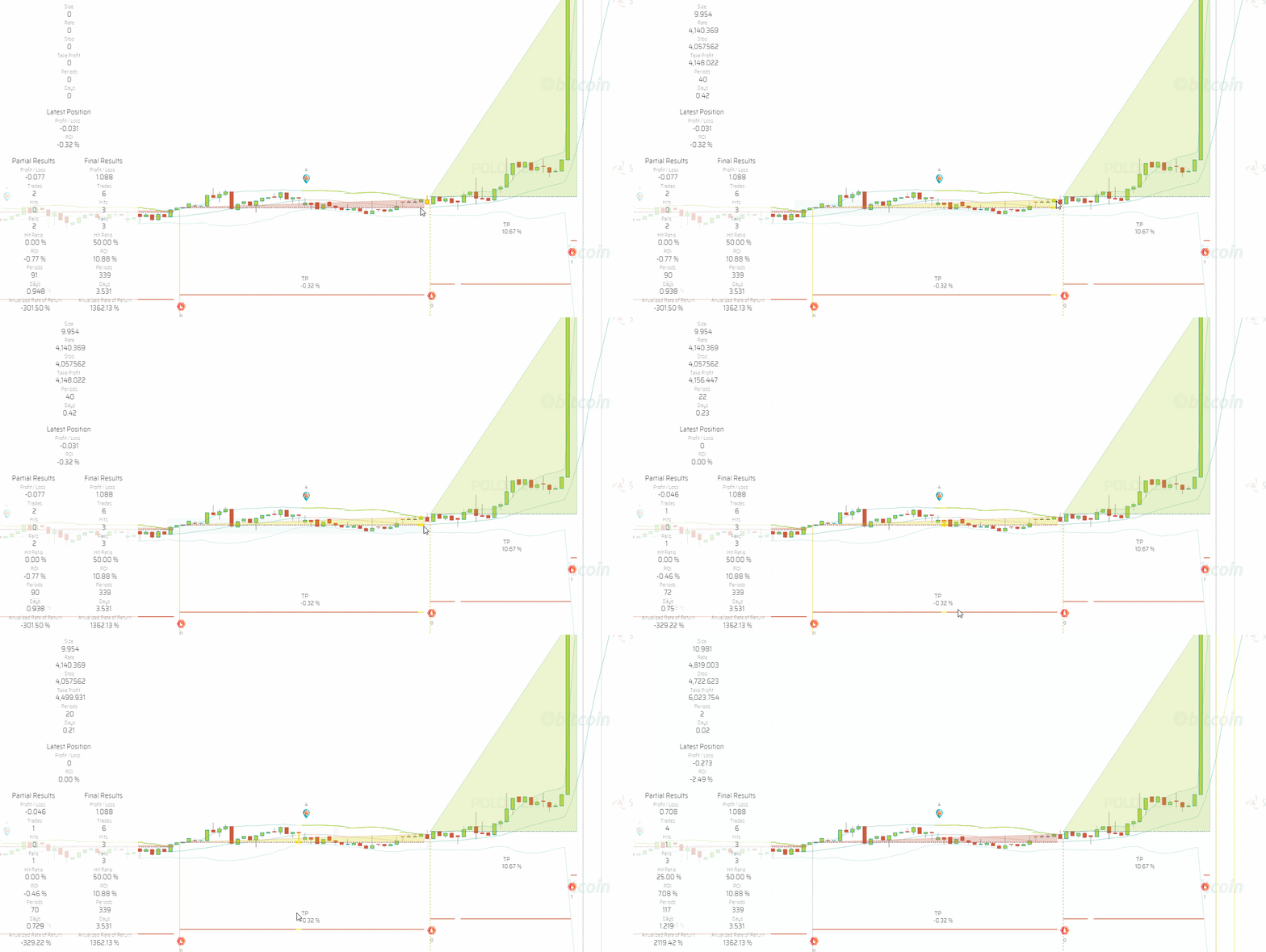
To illustrate how fees affect your bottom line, take a look at the image below.
|
||||
|
||||
[](https://user-images.githubusercontent.com/13994516/63636432-8d8cdf80-c66f-11e9-86a3-480d157d8126.gif)
|
||||
|
||||
The trade hits the take profit target above the Position Rate level, however, due to fees, the trade has a negative 0.32% ROI.
|
||||
|
||||
In the context of forward testing and live trading sessions, the fee structure assumptions do not affect actual transactions. However, the parameter is taken into account when creating simulation layers, which are also available during forward testing and live trading.
|
||||
|
||||
<!-- CONTENT ends -->
|
||||
|
||||
{% if include.adding != "" %}
|
||||
|
||||
{{include.adding}} Adding {{preposition}} {{title}}
|
||||
|
||||
<!-- ADDING starts -->
|
||||
|
||||
To add a parameter that may be missing, select *Add Missing Params* on the parameters node menu.
|
||||
|
||||
<!-- ADDING ends -->
|
||||
|
||||
{% endif %}
|
||||
|
||||
{% if include.configuring != "" %}
|
||||
|
||||
{{include.configuring}} Configuring the {{title}}
|
||||
|
||||
<!-- CONFIGURING starts -->
|
||||
|
||||
Select *Configure Fee Structure* on the menu to access the configuration.
|
||||
|
||||
```json
|
||||
{
|
||||
"maker": 0.15,
|
||||
"taker": 0.25
|
||||
}
|
||||
```
|
||||
|
||||
* ```maker``` is the setting for the fee the exchange charges when an order adds liquidity to the market, such as with limit orders.
|
||||
|
||||
* ```taker``` is the setting for the fee the exchange charges when an order takes liquidity from the market, such as with market or instant orders.
|
||||
|
||||
{% include note.html content="Check the fees structure in your exchange, carefully looking into the tier you fall in to feed accurate assumptions to your backtesting and paper trading sessions." %}
|
||||
|
||||
{% include note.html content="If the fee structure parameter is left empty or detached both from your session and your trading system, fees are not computed during simulations." %}
|
||||
|
||||
{% include important.html content="Remember that, for the time being, and until the new execution engine is released, all orders placed by the trading bot are *market orders*, thus, the *taker* fee applies in all cases." %}
|
||||
|
||||
<!-- CONFIGURING ends -->
|
||||
|
||||
{% endif %}
|
||||
@@ -0,0 +1,50 @@
|
||||
<!-- TITLE AND DEFINITION starts -->
|
||||
|
||||
{% assign title = "Parameters" %}
|
||||
{% assign definition = site.data.trading_system.parameters %}
|
||||
{% assign preposition = "" %}
|
||||
|
||||
<!-- TITLE AND DEFINITION ends -->
|
||||
|
||||
{% if include.heading != "" %}
|
||||
{{include.heading}} {{title}}
|
||||
{% endif %}
|
||||
|
||||
{% if include.icon != "no" %}
|
||||
<img src='images/icons/{{include.icon}}{{ title | downcase | replace: " ", "-" }}.png' />
|
||||
{% endif %}
|
||||
|
||||
**{{ definition }}**
|
||||
|
||||
<!-- CONTENT starts -->
|
||||
|
||||
Each testing session has its own set of parameters. This allows you to configure different trading sessions with different parameters, and go back and forth between them as required. For instance, you may have different backtesting sessions with different date ranges, different exchange fees or different slippage settings.
|
||||
|
||||
<!-- CONTENT ends -->
|
||||
|
||||
{% if include.adding != "" %}
|
||||
|
||||
{{include.adding}} Adding {{preposition}} {{title}}
|
||||
|
||||
<!-- ADDING starts -->
|
||||
|
||||
To add a parameters node, select *Add Parameters* on the session or the trading system menu, depending on the context. When a parameters node is added, the full set of parameters are created with it.
|
||||
|
||||
If you already have a parameters node but are missing some of the parameters, then select *Add Missing Params* on the menu.
|
||||
|
||||
<!-- ADDING ends -->
|
||||
|
||||
{% endif %}
|
||||
|
||||
{% if include.configuring != "" %}
|
||||
|
||||
{{include.configuring}} Configuring the {{title}}
|
||||
|
||||
<!-- CONFIGURING starts -->
|
||||
|
||||
XXXXXXXXXXXXXXXXXXXXXXXXXXXXXXXXXXXXXXXXXXXXXXXXXXXXXX
|
||||
|
||||
<!-- CONFIGURING ends -->
|
||||
|
||||
{% endif %}
|
||||
|
||||
@@ -0,0 +1,49 @@
|
||||
<!-- TITLE AND DEFINITION starts -->
|
||||
|
||||
{% assign title = "Quoted Asset" %}
|
||||
{% assign definition = site.data.trading_system.quote_asset %}
|
||||
{% assign preposition = "a" %}
|
||||
|
||||
<!-- TITLE AND DEFINITION ends -->
|
||||
|
||||
{% if include.heading != "" %}
|
||||
{{include.heading}} {{title}}
|
||||
{% endif %}
|
||||
|
||||
{% if include.icon != "no" %}
|
||||
<img src='images/icons/{{include.icon}}{{ title | downcase | replace: " ", "-" }}.png' />
|
||||
{% endif %}
|
||||
|
||||
**{{ definition }}**
|
||||
|
||||
<!-- CONTENT starts -->
|
||||
|
||||
The quoted asset must reference the second asset in the same market of the same exchange as the reference established with the base asset.
|
||||
|
||||
<!-- CONTENT ends -->
|
||||
|
||||
{% if include.adding != "" %}
|
||||
|
||||
{{include.adding}} Adding {{preposition}} {{title}}
|
||||
|
||||
<!-- ADDING starts -->
|
||||
|
||||
To add a parameter that may be missing, select *Add Missing Params* on the parameters node menu.
|
||||
|
||||
{% include note.html content="After adding a quoted asset node, make sure you establish a reference to the second asset in the same market of the same exchange as the reference established with the base asset." %}
|
||||
|
||||
<!-- ADDING ends -->
|
||||
|
||||
{% endif %}
|
||||
|
||||
{% if include.configuring != "" %}
|
||||
|
||||
{{include.configuring}} Configuring the {{title}}
|
||||
|
||||
<!-- CONFIGURING starts -->
|
||||
|
||||
XXXXXXXXXXXXXXXXXXXXXXXXXXXXXXXXXXXXXXXXXXXXXXXXXXXXXX
|
||||
|
||||
<!-- CONFIGURING ends -->
|
||||
|
||||
{% endif %}
|
||||
@@ -0,0 +1,67 @@
|
||||
<!-- TITLE AND DEFINITION starts -->
|
||||
|
||||
{% assign title = "Slippage" %}
|
||||
{% assign definition = site.data.trading_system.slipage %}
|
||||
{% assign preposition = "a" %}
|
||||
|
||||
<!-- TITLE AND DEFINITION ends -->
|
||||
|
||||
{% if include.heading != "" %}
|
||||
{{include.heading}} {{title}}
|
||||
{% endif %}
|
||||
|
||||
{% if include.icon != "no" %}
|
||||
<img src='images/icons/{{include.icon}}{{ title | downcase | replace: " ", "-" }}.png' />
|
||||
{% endif %}
|
||||
|
||||
**{{ definition }}**
|
||||
|
||||
<!-- CONTENT starts -->
|
||||
|
||||
In the context of forward testing and live trading sessions, slippage does not affect the actual transactions. However, the parameter is taken into account when creating simulation layers, which are also available during forward testing and live trading.
|
||||
|
||||
Slippage is factored both in the session reports and in the graphic representation of each trade provided by the simulation trades product of the trading bot.
|
||||
|
||||
<!-- CONTENT ends -->
|
||||
|
||||
{% if include.adding != "" %}
|
||||
|
||||
{{include.adding}} Adding {{preposition}} {{title}}
|
||||
|
||||
<!-- ADDING starts -->
|
||||
|
||||
To add a parameter that may be missing, select *Add Missing Params* on the parameters node menu.
|
||||
|
||||
<!-- ADDING ends -->
|
||||
|
||||
{% endif %}
|
||||
|
||||
{% if include.configuring != "" %}
|
||||
|
||||
{{include.configuring}} Configuring the {{title}}
|
||||
|
||||
<!-- CONFIGURING starts -->
|
||||
|
||||
Select *Configure Slippage* on the menu to access the configuration.
|
||||
|
||||
```json
|
||||
{
|
||||
"positionRate": 0.1,
|
||||
"stopLoss": 0.2,
|
||||
"takeProfit": 0.3
|
||||
}
|
||||
```
|
||||
|
||||
* ```positionRate``` is the slippage value to be applied to the rate of the take position order, expressed as a percentage (*i.e.:* 0.1 means 0.1%).
|
||||
|
||||
* ```stopLoss``` is the slippage value to be applied to the rate of the stop order, expressed as a percentage (*i.e.:* 0.2 means 0.2%).
|
||||
|
||||
* ```takeProfit``` is the slippage value to be applied to the rate of the take profit order, expressed as a percentage (*i.e.:* 0.3 means 0.3%).
|
||||
|
||||
The number you enter is applied as a percentage of the price of the order and added or subtracted from the price depending on the circumstances, always working against you. For instance, ```"positionRate": 0.1``` means the position will be set at a price 0.1% higher or lower depending on which of the assets in the pair is your base asset.
|
||||
|
||||
{% include note.html content="If the slippage parameter is left empty or detached both from your session and your trading system, slippage is not computed during simulations."%}
|
||||
|
||||
<!-- CONFIGURING ends -->
|
||||
|
||||
{% endif %}
|
||||
@@ -0,0 +1,47 @@
|
||||
<!-- TITLE AND DEFINITION starts -->
|
||||
|
||||
{% assign title = "XXXXXXXXXXXXXXXX" %}
|
||||
{% assign definition = site.data.trading_system.XXXXXXXXXXXXXXXX %}
|
||||
{% assign preposition = "XXXXXXXXXXXXXXXX" %}
|
||||
|
||||
<!-- TITLE AND DEFINITION ends -->
|
||||
|
||||
{% if include.heading != "" %}
|
||||
{{include.heading}} {{title}}
|
||||
{% endif %}
|
||||
|
||||
{% if include.icon != "no" %}
|
||||
<img src='images/icons/{{include.icon}}{{ title | downcase | replace: " ", "-" }}.png' />
|
||||
{% endif %}
|
||||
|
||||
**{{ definition }}**
|
||||
|
||||
<!-- CONTENT starts -->
|
||||
|
||||
XXXXXXXXXXXXXXXXXXXXXXXXXXXXXXXXXXXXXXXXXXXXXXXXXXXXXX
|
||||
|
||||
<!-- CONTENT ends -->
|
||||
|
||||
{% if include.adding != "" %}
|
||||
|
||||
{{include.adding}} Adding {{preposition}} {{title}}
|
||||
|
||||
<!-- ADDING starts -->
|
||||
|
||||
XXXXXXXXXXXXXXXXXXXXXXXXXXXXXXXXXXXXXXXXXXXXXXXXXXXXXX
|
||||
|
||||
<!-- ADDING ends -->
|
||||
|
||||
{% endif %}
|
||||
|
||||
{% if include.configuring != "" %}
|
||||
|
||||
{{include.configuring}} Configuring the {{title}}
|
||||
|
||||
<!-- CONFIGURING starts -->
|
||||
|
||||
XXXXXXXXXXXXXXXXXXXXXXXXXXXXXXXXXXXXXXXXXXXXXXXXXXXXXX
|
||||
|
||||
<!-- CONFIGURING ends -->
|
||||
|
||||
{% endif %}
|
||||
@@ -0,0 +1,86 @@
|
||||
<!-- TITLE AND DEFINITION starts -->
|
||||
|
||||
{% assign title = "Time Frame" %}
|
||||
{% assign definition = site.data.trading_system.time_frame %}
|
||||
{% assign preposition = "a" %}
|
||||
|
||||
<!-- TITLE AND DEFINITION ends -->
|
||||
|
||||
{% if include.heading != "" %}
|
||||
{{include.heading}} {{title}}
|
||||
{% endif %}
|
||||
|
||||
{% if include.icon != "no" %}
|
||||
<img src='images/icons/{{include.icon}}{{ title | downcase | replace: " ", "-" }}.png' />
|
||||
{% endif %}
|
||||
|
||||
**{{ definition }}**
|
||||
|
||||
<!-- CONTENT starts -->
|
||||
|
||||
In the context of backtesting sessions, what time frame you decide to run the session on depends on the strategies being tested. If strategies make decisions based on the 1 hour candle and above, then ```01-hs``` may be the best choice. However, if decisions are influenced by sub-hour candles then you should match the time frame accordingly.
|
||||
|
||||
In the context of live sessions, that is, paper trading, forward testing and live trading, you should run the session on the ```01-min``` time frame so that the trading bot reacts fast when the price tags the take profit or stop loss targets.
|
||||
|
||||
<!-- CONTENT ends -->
|
||||
|
||||
{% if include.adding != "" %}
|
||||
|
||||
{{include.adding}} Adding {{preposition}} {{title}}
|
||||
|
||||
<!-- ADDING starts -->
|
||||
|
||||
To add a parameter that may be missing, select *Add Missing Params* on the parameters node menu.
|
||||
|
||||
<!-- ADDING ends -->
|
||||
|
||||
{% endif %}
|
||||
|
||||
{% if include.configuring != "" %}
|
||||
|
||||
{{include.adding}} Configuring the {{title}}
|
||||
|
||||
<!-- CONFIGURING starts -->
|
||||
|
||||
Select *Configure Time Frame* on the menu to access the configuration.
|
||||
|
||||
```js
|
||||
{
|
||||
"value": "01-min"
|
||||
}
|
||||
```
|
||||
|
||||
* ```value``` is the setting for the time frame. You may use any of the values below.
|
||||
|
||||
Available options at the sub-hour level are:
|
||||
|
||||
```json
|
||||
01-min
|
||||
02-min
|
||||
03-min
|
||||
04-min
|
||||
05-min
|
||||
10-min
|
||||
15-min
|
||||
20-min
|
||||
30-min
|
||||
45-min
|
||||
```
|
||||
|
||||
Available options at larger time frames are:
|
||||
|
||||
```json
|
||||
01-hs
|
||||
02-hs
|
||||
03-hs
|
||||
04-hs
|
||||
06-hs
|
||||
08-hs
|
||||
12-hs
|
||||
24-hs
|
||||
```
|
||||
|
||||
<!-- CONFIGURING ends -->
|
||||
|
||||
{% endif %}
|
||||
|
||||
@@ -0,0 +1,72 @@
|
||||
<!-- TITLE AND DEFINITION starts -->
|
||||
|
||||
{% assign title = "Time Range" %}
|
||||
{% assign definition = site.data.trading_system.time_range %}
|
||||
{% assign preposition = "a" %}
|
||||
|
||||
<!-- TITLE AND DEFINITION ends -->
|
||||
|
||||
{% if include.heading != "" %}
|
||||
{{include.heading}} {{title}}
|
||||
{% endif %}
|
||||
|
||||
{% if include.icon != "no" %}
|
||||
<img src='images/icons/{{include.icon}}{{ title | downcase | replace: " ", "-" }}.png' />
|
||||
{% endif %}
|
||||
|
||||
**{{ definition }}**
|
||||
|
||||
<!-- CONTENT starts -->
|
||||
|
||||
|
||||
|
||||
<!-- CONTENT ends -->
|
||||
|
||||
{% if include.adding != "" %}
|
||||
|
||||
{{include.adding}} Adding {{preposition}} {{title}}
|
||||
|
||||
<!-- ADDING starts -->
|
||||
|
||||
To add a parameter that may be missing, select *Add Missing Params* on the parameters node menu.
|
||||
|
||||
<!-- ADDING ends -->
|
||||
|
||||
{% endif %}
|
||||
|
||||
{% if include.configuring != "" %}
|
||||
|
||||
{{include.configuring}} Configuring the {{title}}
|
||||
|
||||
<!-- CONFIGURING starts -->
|
||||
|
||||
Select *Configure Time Range* on the menu to access the configuration. The configuration varies slightly depending on the type of session you are running.
|
||||
|
||||
{{include.configuring}}# On Backtesting Sessions
|
||||
|
||||
```json
|
||||
{
|
||||
"initialDatetime": "2019-09-01T00:00:00.000Z",
|
||||
"finalDatetime": "2019-09-25T00:00:00.000Z"
|
||||
}
|
||||
```
|
||||
|
||||
* ```initialDatetime``` is the datetime the session starts at. If you don't set an *initialDatetime* the system's fallback mechanism will try to get it from the parameters defined at the level of the trading system.
|
||||
|
||||
* ```finalDatetime``` is the datetime the session finishes at. If you don't set a *finalDatetime* at the level of the testing session or the trading system, then calculations will run until the date there is data available.
|
||||
|
||||
{{include.configuring}}# On Paper Trading, Forward Testing and Live Trading Sessions
|
||||
|
||||
These sessions always start at the datetime the session is run, therefore, there is no configuration of an initial datetime.
|
||||
|
||||
```json
|
||||
{
|
||||
"finalDatetime": "2019-09-25T00:00:00.000Z"
|
||||
}
|
||||
```
|
||||
|
||||
* ```finalDatetime``` is the datetime the session finishes at. If you don't set a *finalDatetime* at the level of the testing session or the trading system, then the session runs for one year.
|
||||
|
||||
<!-- CONFIGURING ends -->
|
||||
|
||||
{% endif %}
|
||||
Reference in new issue
Block a user